-
ChatGPT로 월드컵 중계 화면 스타일 이미지 만드는 방법생활 2026. 6. 23. 19:43
목차

ChatGPT로 월드컵 중계 화면 스타일 이미지 만드는 방법 ChatGPT를 이용하면 월드컵 중계 화면처럼 생생한 스포츠 방송 스타일 이미지를 만들 수 있습니다.
이전에 유행햇던 KBO 야구 중계 화면처럼 가능합니다.
실제 중계 카메라에 잡힌 듯한 직캠 사진을 ChatGPT로 만들 수 있습니다.
월드컵 중계 프롬프트
사진을 첨부해서 다음의 프롬프트를 실행하면 됩니다.
반응형더보기Use the attached photo as the exact facial reference. Create an ultra realistic 16:9 widescreen international football broadcast crowd shot during a tense evening match between South Korea and Mexico.
Preserve the original face and hairstyle naturally without over-editing. Wide shot from an eye-level spectator perspective using a super telephoto broadcast zoom lens. The person, wearing a red South Korea national team football jersey, is sitting in the stadium stands, watching the match with a deeply anxious and serious facial expression, naturally reacting to the frustrating game instead of looking at the camera.
Surrounding fans in red shirts are slightly blurred with realistic stadium depth compression and soft bokeh. Include authentic stadium details such as cheering red scarfs, stadium LED lights, and subtle live TV broadcast graphics at the bottom showing an official international match score bug that displays "MEX 1 - 0 KOR" with a match timer in the late second half.
Slight handheld shake, compression artifacts, low-light broadcast noise, Sports live broadcast aesthetic, candid sports camera realism. Aspect ratio is 16:9.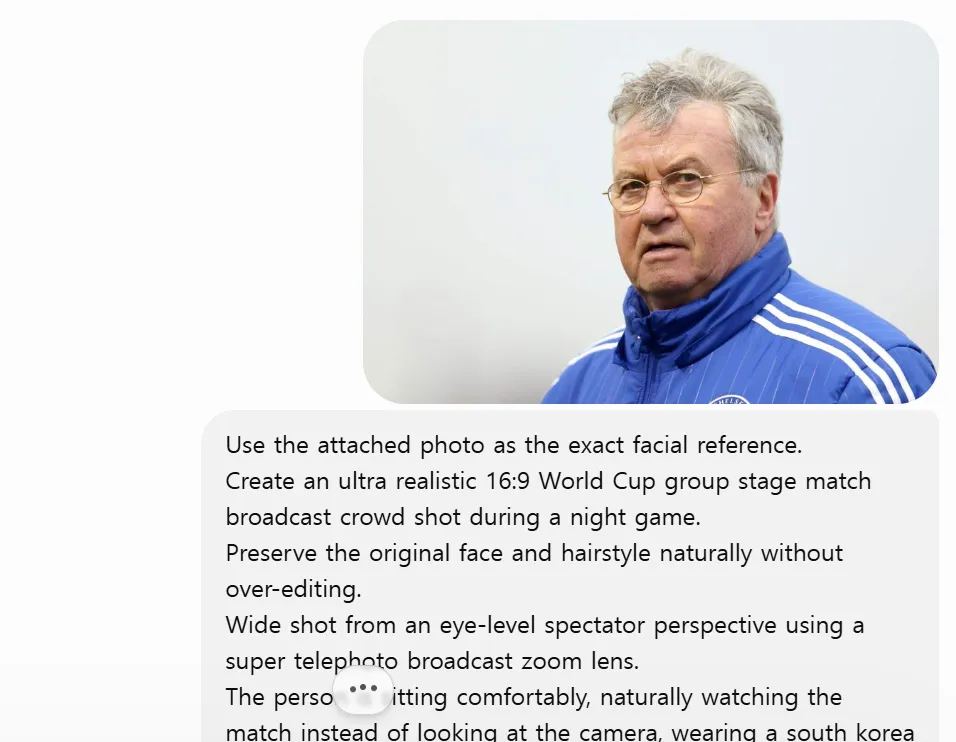
ChatGPT 월드컵 중계 프롬프트 
ChatGPT 월드컵 중계 프롬프트
환호하는 클로즈업 버전
사진을 첨부해서 다음의 프롬프트를 실행하면 됩니다.
더보기Use the attached photo as the exact facial reference. Preserve the person's exact face, facial features, hairstyle, and skin tone accurately without over-editing.
Create a highly realistic JTBC World Cup live broadcast close-up shot.
Scene: The person in the attached photo is sitting in the stadium stands during the South Korea vs Mexico match. He suddenly notices the JTBC broadcast camera, stands up excitedly, raises both arms high, and cheers passionately with a very emotional and happy expression.
Match result: Mexico 1 - 0 South Korea (FULL TIME).
Style: Professional JTBC sports broadcast camera with KBO baseball broadcast graphic style.
Realistic night stadium lighting, slight handheld camera shake, authentic live broadcast feel, subtle compression artifacts.
Include realistic JTBC broadcast overlay:
- Score bug: Mexico 1 - 0 South Korea
- "FULL TIME" text
- JTBC logo
- Match information
Ultra realistic, cinematic sports broadcast photography, sharp detail on the face, 16:9 aspect ratio, high quality.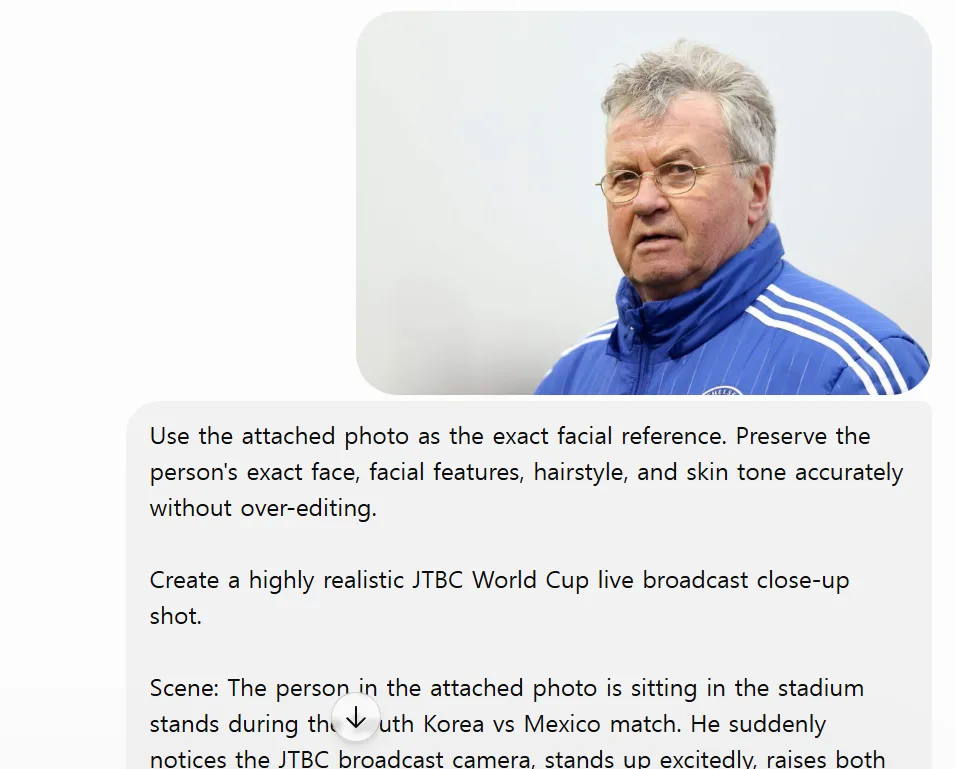
ChatGPT 월드컵 중계 환호하는 클로즈업 프롬프트 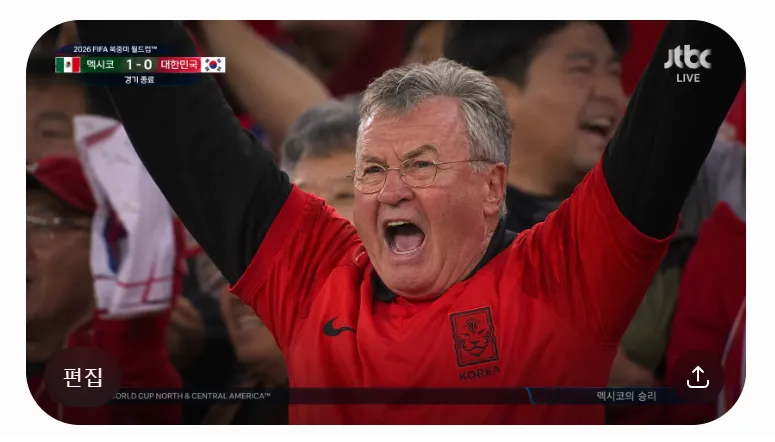
ChatGPT 월드컵 중계 환호하는 클로즈업 프롬프트
광화문 광장 버전
사진을 첨부해서 다음의 프롬프트를 실행하면 됩니다.
더보기Use the attached photo as the exact facial reference. Preserve the person's exact face, hairstyle, facial features, and skin tone accurately.
Create a highly realistic KBS TV News live broadcast scene at Gwanghwamun Square during the South Korea vs Mexico World Cup match.
The person in the attached photo looks deeply disappointed and regretful after conceding a goal. Show a bitter, heavy-hearted expression with a slightly lowered head.
Match result: Mexico 1 - 0 South Korea (FULL TIME).
Include clear KBS broadcast graphics:
- Score bug: Mexico 1 - 0 South Korea
- "FULL TIME"
- Lower third caption: "후반 5분 아쉬운 실점"
- "광화문 광장 거리 응원" text
- KBS logo and live indicators
Night scene at Gwanghwamun Square with many Korean fans looking disappointed and subdued after the late goal. Realistic crowd atmosphere, some fans with lowered Taegukgi flags.
Professional KBS sports news broadcast style, slight handheld camera feel, emotional and somber mood, realistic night lighting, 16:9 aspect ratio, high detail.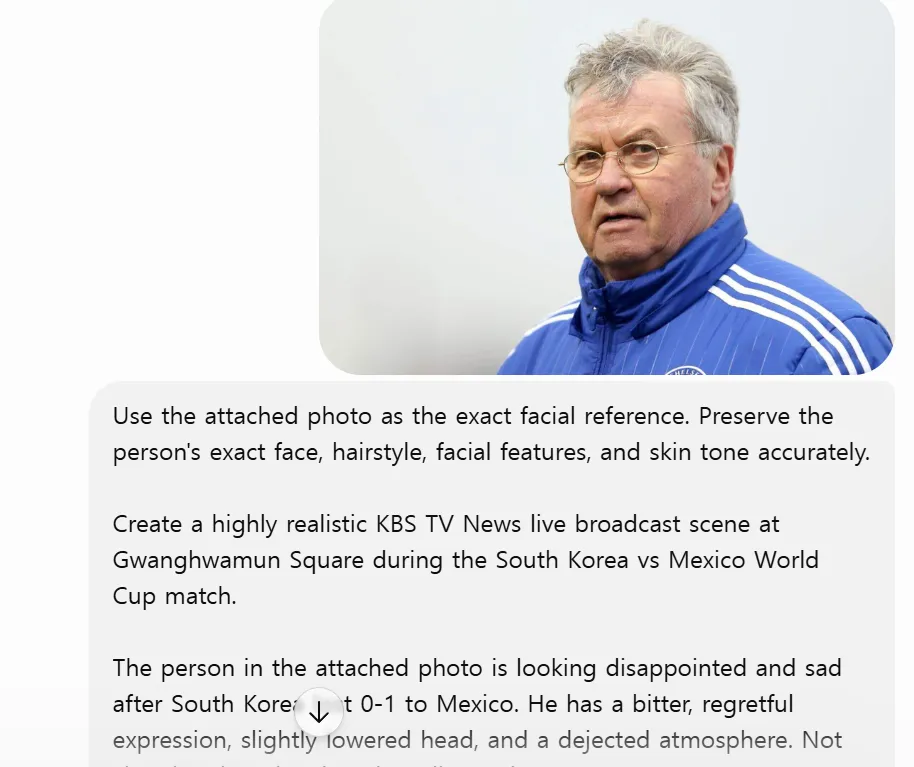
ChatGPT 월드컵 중계 광화문 광장 거리 응원 TV 뉴스 화면 프롬프트 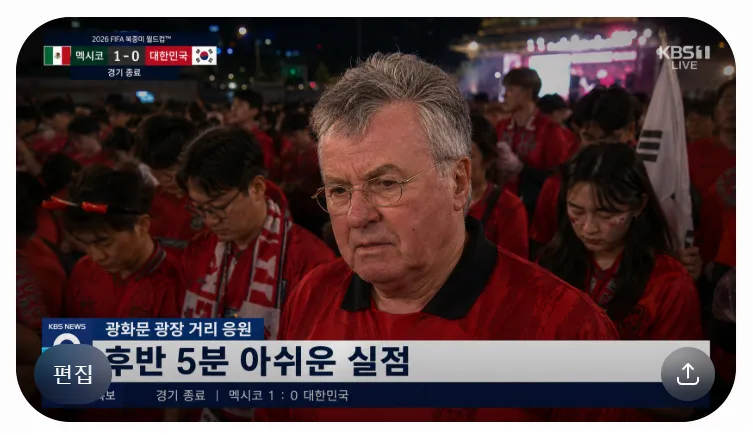
ChatGPT 월드컵 중계 광화문 광장 거리 응원 TV 뉴스 화면 프롬프트
만능 프롬프트
프롬프트를 처음부터 끝까지 직접 작성하지 말고 AI에게 프롬프트 작성을 요청해서 프롬프트를 얻을 수 있습니다.
[생활] - ChatGPT 원하는 답변 얻는 프롬프트 작성 방법 예시 모음
ChatGPT 원하는 답변 얻는 프롬프트 작성 방법 예시 모음
ChatGPT는 질문을 어떻게 입력하느냐에 따라 답변의 품질이 달라집니다. 짧게 입력하거나 막연하게 입력하면 두루뭉술한 답변이 돌아옵니다. 몇 가지 규칙을 지키면 원하는 답변을 얻을 수 있습
blog.baobtree.com
캐러셀 프롬프트
ChatGPT로 30초 만에 캐러셀을 만들 수 있습니다.
[생활] - ChatGPT로 인스타그램 캐러셀 30초 만에 만드는 방법
ChatGPT로 인스타그램 캐러셀 30초 만에 만드는 방법
캐러셀 콘텐츠는 카드뉴스 형태의 이미지입니다. 인스타그램 캐러셀은 한 번에 여러 장의 이미지를 공유할 수 있습니다. 직접 기획하고 문구를 정리하고 디자인하는 과정은 시간이 많이 걸립니
blog.baobtree.com
미니미 프롬프트
ChatGPT로 미니미 캐릭터를 만들 수 있습니다.
[생활] - ChatGPT로 나만의 미니미 캐릭터 만드는 방법
ChatGPT로 나만의 미니미 캐릭터 만드는 방법
ChatGPT 이미지 생성으로 나만의 캐릭터를 만들 수 있습니다. 프로필 사진으로 사용하거나 스티커, 굿즈 제작까지 활용 범위도 넓습니다. 특히 자신만의 스타일로 미니미 캐릭터를 만들 수 있습니
blog.baobtree.com
카카오톡 인스타그램 DM 프롬프트
ChatGPT로 카카오톡과 인스타그램 DM 이미지를 만들 수 있습니다.
[생활] - ChatGPT로 카카오톡·인스타그램 DM 대화창 만드는 방법
ChatGPT로 카카오톡·인스타그램 DM 대화창 만드는 방법
ChatGPT의 이미지 생성 기능을 활용하면 실제 메신저 화면처럼 대화창 이미지를 만들 수 있습니다. ChatGPT로 쉽게 만들 수 있습니다. 원하는 내용만 입력하면 실제 캡처처럼 만들 수 있습니다. 카카
blog.baobtree.com
ChatGPT 개인 맞춤 설정
개인 맞춤 설정을 하면 매번 똑같은 지시사항을 반복해서 입력할 필요가 없습니다.
[생활] - ChatGPT 개인 맞춤 설정 사용 방법 (추천 프롬프트 5가지 포함)
ChatGPT 개인 맞춤 설정 사용 방법 (추천 프롬프트 5가지 포함)
ChatGPT를 사용하다 보면 매번 같은 설명을 해야 하는 경우가 있습니다. 답변 스타일을 지정하거나 글 작성 규칙을 알려주거나 특정 분야 전문가처럼 답변하도록 요청하는 경우입니다. 이럴 때 사
blog.baobtree.com
프로젝트 지침
프로젝트 지침은 프로젝트마다 목적, 역할, 제약 조건 등을 미리 알려주는 설정입니다.
지침에 맞는 답변을 출력합니다.
맞춤형 지침과 다르게 해당 프로젝트 내에서만 적용됩니다.[생활] - ChatGPT 프로젝트 지침 작성 방법 (효과적인 목표 설정 팁 포함)
ChatGPT 프로젝트 지침 작성 방법 (효과적인 목표 설정 팁 포함)
ChatGPT 프로젝트 기능을 활용하면 특정 주제나 업무에 특화된 AI 어시스턴트를 만들 수 있습니다. 이때 가장 중요한 것이 프로젝트 지침입니다. 지침을 잘 작성하면 AI가 일관되고 정확한 답변을
blog.baobtree.com
Fable 스타일 지침
클로드의 Fable 5 스타일은 특정 문체에 맞춰 일관된 결과물을 출력하도록 말투를 제어하는 프롬프트 및 시스템 설정입니다.
[생활] - Fable처럼 일하는 ChatGPT 프로젝트 지침 및 프롬프트 작성 방법
Fable처럼 일하는 ChatGPT 프로젝트 지침 및 프롬프트 작성 방법
Fable은 AI를 단순한 챗봇이 아니라 절차를 따르고 검증하며 결과를 관리하는 작업자로 활용합니다. 일반적인 AI 스타일이 지시한 대로 받아쓰는 조수라면 Fable 스타일은 목표만 던져주면 알아서
blog.baobtree.com
AI 대화 학습 끄기
AI는 모델 학습을 위해 기본적으로 사용자의 대화 데이터를 수집하고 있습니다.
개인 정보 노출 위험도 있고 해서 끄는 것이 좋습니다.
주요 AI 서비스의 대화 학습 끄기 설정은 각 서비스의 설정 메뉴에서 간단하게 변경할 수 있습니다.[생활] - AI 대화 데이터 모델 학습 끄기 설정 방법
AI 대화 데이터 모델 학습 끄기 설정 방법
AI 서비스에 가입하면 대화 데이터들은 기본적으로 AI 학습에 이용됩니다. 주요 AI 서비스 챗지피티, 클로드, 그록, 제미나이, 퍼플렉시티 등은 학습에 사용하지 않도록 차단하는 옵션을 제공합니
blog.baobtree.com
단축키
자주 쓰는 단축키를 알면 유용하게 사용할 수 있습니다.
[생활] - ChatGPT 알면 유용하게 자주 사용하는 단축키 사용 방법
ChatGPT 알면 유용하게 자주 사용하는 단축키 사용 방법
ChatGPT를 사용할 때 알아두면 편리한 단축키가 있습니다. ChatGPT를 더 빠르고 효율적으로 쓰려면 단축키를 익히는 것이 좋습니다. ChatGPT 웹 버전의 화면 내에서 언제든지 단축키 전체 목록을 띄워
blog.baobtree.com
요약
1. 기본 중계 화면 버전
2. 환호하는 클로즈업 버전
3. 광화문 광장 거리 응원 버전반응형'생활' 카테고리의 다른 글
무료 대기 경보 미세먼지 서비스 신청 방법 (0) 2026.06.27 ChatGPT로 카카오톡·인스타그램 DM 대화창 만드는 방법 (0) 2026.06.26 ChatGPT로 이모티콘 스티커 만드는 방법 (0) 2026.06.22 스팸전화 차단 설정 방법 (두낫콜 + 금융·인터넷·TV·여론조사) (0) 2026.06.21 ChatGPT로 나만의 미니미 캐릭터 만드는 방법 (0) 2026.06.20